Configuration Manual — Eastron
1. Introduction
Dear customer,
The following configuration instructions describe the integration of Eastron meters in FEMS. Please read these instructions carefully before starting the installation and configuration.
2. Product description
The following Eastron meters are compatible with FEMS and can be integrated:
-
SDM630 MODBUS-MID
-
SDM72DM
| The Eastron meters must be Modbus-capable. |
3. Integration via Modbus/RTU
Installation of the meter and configuration according to the manufacturer’s instructions.
3.1. Configuration of the meter
The following parameters must be set in the meter during integration:
-
Baud rate: 9600
-
Stop bit: 1
-
Parity: None
The device address (Modbus ID) can be freely selected and must be individual for each meter.
3.2. Configuration of the app
When you ordered the FEMS App Production and Consumption Meter, you received a 16-digit license key. You can use this license key to redeem the app independently in the FEMS App Center. You can find instructions on how to do this at here.
After entering the license key, the configuration interface appears.
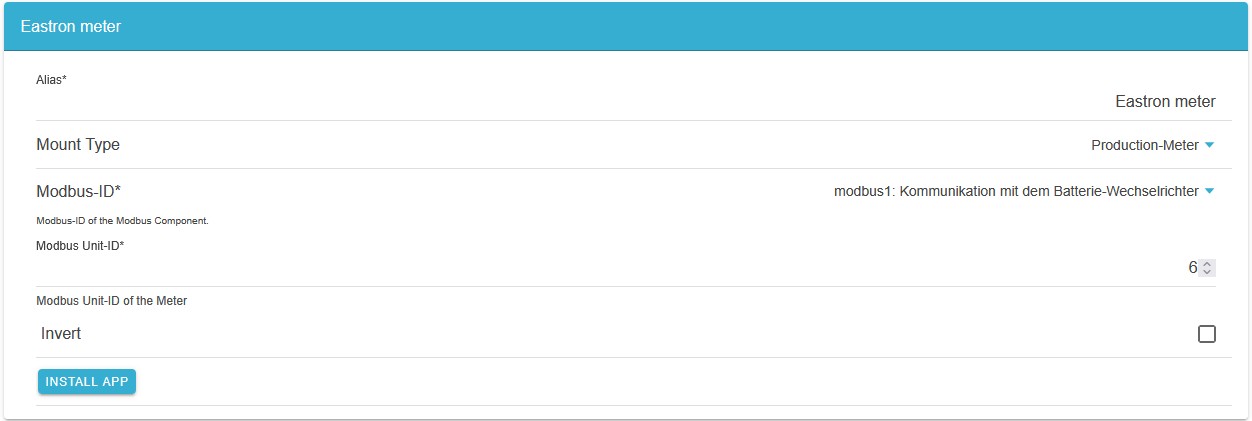
-
Assign a suitable alias.
-
Specify the type of use as Production Meter or Consumption Meter.
-
Select the device to be measured under Modbus ID.
-
Select whether you want to invert the values.
-
Complete the setup by tapping/clicking on INSTALL APP.